Free 4×6 Packing Slip Maker for Thermal Printers
Print packing slips on the same 4×6 thermal printer you already use for shipping labels. Enter the order, watch a live preview, and download a print-ready PDF — Smart Fit squeezes long orders onto the fewest readable pages.
Free · Runs in your browser · No uploads · No account
Quick Answer
Make your 4×6 packing slip
Fill in the order and the preview updates instantly. Everything happens in your browser — nothing you type is uploaded.
Print at Actual Size / 100% on 4×6 stock — not “Fit to page.” Long orders continue onto extra 4×6 pages instead of shrinking text below 7 pt.
What a 4×6 packing slip looks like
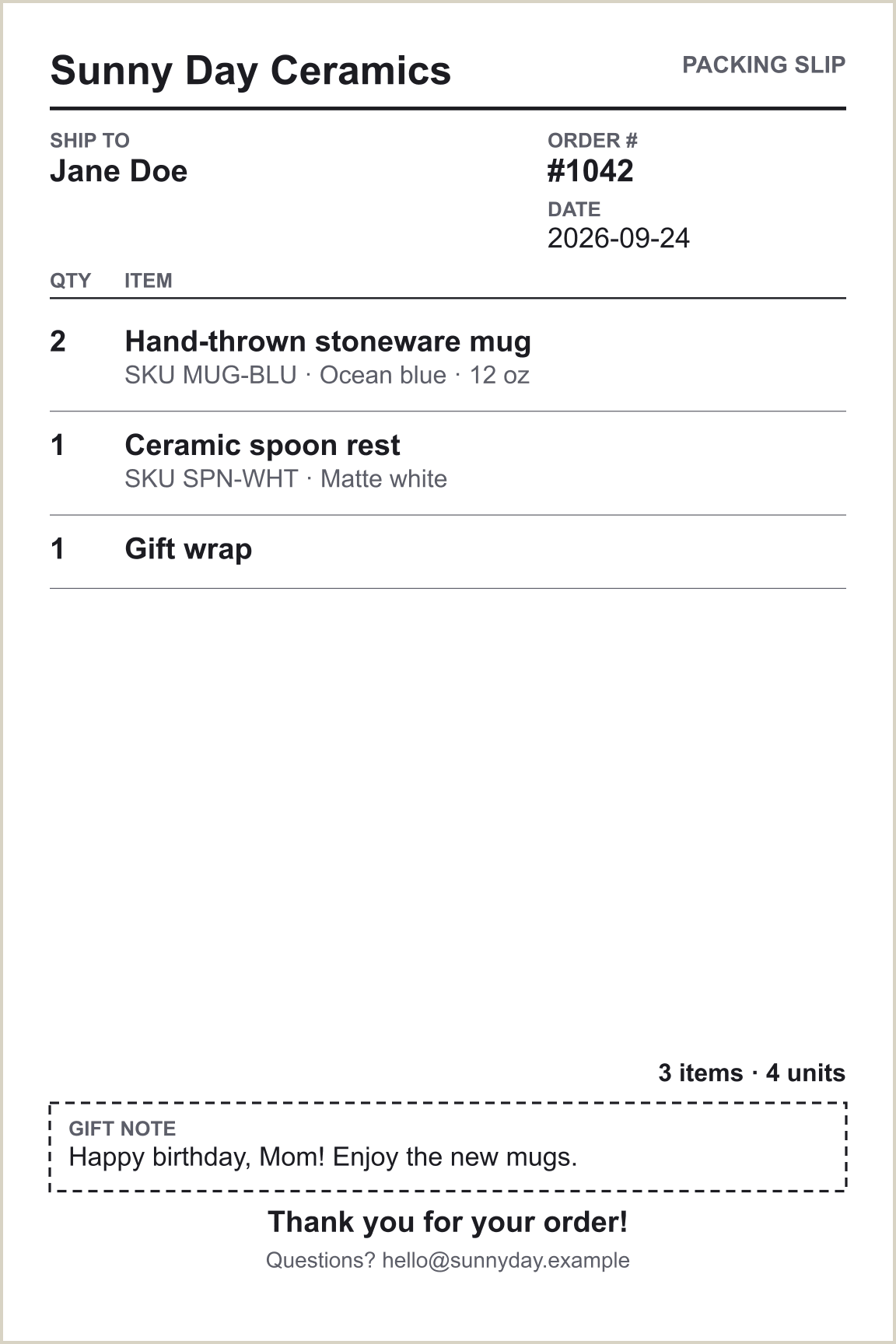
This is real output from the maker above — a 4×6 in page with the order number, customer, items with SKU and variant, a gift note and a thank-you line. Everything sits inside a safe margin so thermal printers don’t clip the edges.
Smart Fit: the smallest readable number of pages
A normal packing slip is designed for a full sheet of paper. A 4×6 slip has about a quarter of that space, so a five-line order and a forty-line order can’t use the same layout. FitMyPage measures your order with real font metrics and picks the layout with the fewest pages — and, among equals, the largest readable type.
| Order size | What Auto Fit does |
|---|---|
| Short order | Spacious layout with generous row spacing (9.5 pt item text). |
| Medium order | Compact layout: smaller row padding and 8 pt text. |
| Long order | Two-column item list to use the full width of the label. |
| Very long order | Tighter type, down to a 7 pt floor for item text. |
| Still too long | Continues onto an additional 4×6 page, with the order number and “Page 2 of 3” repeated. |
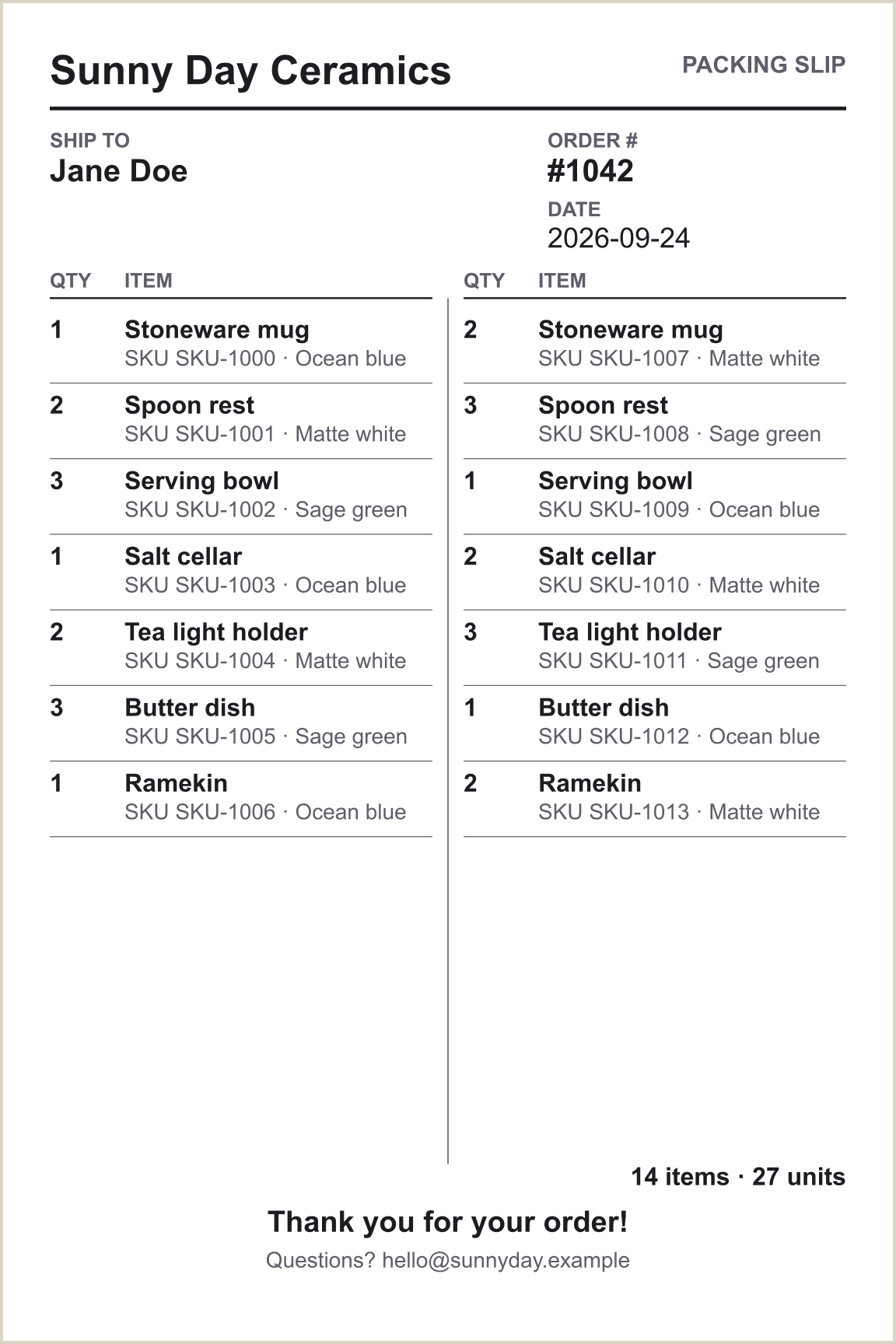
We never shrink text to an unreadable size just to force a single page — a slip your packer can’t read is worse than a second label. Prefer to choose yourself? Switch Layout to Comfortable or Compact.
What to put on a 4×6 packing slip
Space is tight, so put the details a packer or customer actually uses first:
- Order number and date — the first thing a customer quotes when they contact you.
- Customer name — enough to match the slip to the shipping label.
- Item, SKU, variant and quantity — the SKU and variant (size, colour) are what prevent wrong-item mistakes.
- Prices, only when appropriate — turn them off for gift orders.
- Gift note — printed in its own box on the last page.
- Business name, thank-you line and footer — returns address, website or support email.
Want more detail on layout choices and wording? See the 4×6 packing slip template guide.
How to print your packing slip on a thermal printer
- Click Download PDF (or Open to print).
- Open the PDF and choose your 4×6 thermal printer.
- Paper size: choose 4×6 in (100×150 mm) — add it as a custom size in the printer driver if it isn’t listed.
- Scale: Actual Size / 100%. Turn off “Fit to page” and “Shrink to fit.”
- Margins: None or Minimum, and headers/footers off if you print from a browser.
- Orientation: Portrait. The PDF is already 4 in wide by 6 in tall.
- Darkness and speed: if small text looks faint or fuzzy, raise darkness a step or slow the speed a step.
- Print one test slip on a spare 4×6 label before running a batch.
A PDF that says 4×6 doesn’t guarantee your printer driver won’t rescale it. If the slip prints small, cut off or with a large blank margin, see why a packing slip prints too small or run the free thermal printer test.
This maker, a blank template, or your platform’s built-in slip?
Most marketplaces and shipping tools can already print a packing slip. Use whichever fits how you work:
| Option | Best when | Trade-off |
|---|---|---|
| This maker | You want a real 4×6 layout for a thermal printer, gift notes without prices, or slips for orders from any channel. | You type or paste the order details in; nothing is imported. |
| Blank printable template | You’d rather handwrite slips, or need a quick fallback with no typing. | Handwritten, so no auto-fit or totals. |
| Your platform’s built-in slip | It already prints in the size and layout you need (for example, ShipStation’s 4×6 option). | Often laid out for full-size paper, so it can print small on a 4×6 printer. |
Packing slip guides by platform and printer
The maker is the same everywhere; the surrounding workflow isn’t. Pick the guide that matches how you sell or print.
Etsy sellers
Etsy 4×6 packing slip →Shopify stores
Shopify 4×6 packing slip →eBay sellers
eBay 4×6 packing slip →ShipStation users
ShipStation 4×6 packing slip →Rollo printer owners
Rollo packing slip →Munbyn printer owners
Munbyn packing slip →Slip printing too small?
Fix the print size →Prefer to write by hand?
Blank printable template →Private by design
The packing slip is built entirely in your browser — customer names, addresses and order details are never uploaded to FitMyPage. Optional shop settings are stored only on your device, and only if you tick “Remember.” See the Privacy Policy.
Frequently asked questions
What size is a 4×6 packing slip?
A 4×6 packing slip is 4 inches wide by 6 inches tall (100 × 150 mm) — the same size as a standard thermal shipping label. That’s the size this maker creates, so it prints straight to a 4×6 label printer.
How do I make a 4×6 packing slip for free?
Enter the order number, customer and items into the maker above, check the live preview, and download the PDF. It’s free, needs no account, and adds no watermark. You can also download a blank printable template and fill it in by hand.
Can I print a packing slip on a thermal printer?
Yes. Thermal label printers print packing slips like any other document. The key is using a 4×6 page from the start and printing at Actual Size / 100% with the paper size set to 4×6 in. A full-page slip scaled onto a 4×6 label usually comes out too small to read.
What should a packing slip include?
At minimum: order number, customer name and the items with quantities. Most sellers also add the date, SKU and variant for each item, a business name and a return or contact line. Prices and a gift note are optional.
Are my customers’ names and addresses uploaded anywhere?
No. The slip is generated entirely on your device with a JavaScript PDF library. FitMyPage has no server that receives order details, and order data is never saved — only optional shop settings, and only if you tick “Remember.”
What happens when an order has too many items for one slip?
Auto Fit steps through spacious, compact and two-column layouts and down to a 7 pt floor for item text. If the items still don’t fit at a readable size, the order continues onto another 4×6 page, and each page shows the order number and “Page X of Y.”
Can I print packing slips for gift orders without prices?
Yes. Leave “Show prices on the slip” unticked and add the buyer’s message in the gift note box. Prices are off by default.
Can I save my shop name and footer so I don’t retype them?
Yes. Tick “Remember shop name, footer, thank-you and layout on this device.” They are stored in your browser only, and “Clear saved preferences” removes them.
Does it connect to Etsy, Shopify, eBay or ShipStation?
No. Nothing is connected to your store, so no login or API access is needed and no order data leaves your browser. You type or paste the order details in.
More for sellers who print on 4×6
Ready to print your packing slip?
Enter the order, check the preview, and download a 4×6 PDF that fits your thermal printer.
Make a 4×6 Packing Slip